Storage, In camera and out #438
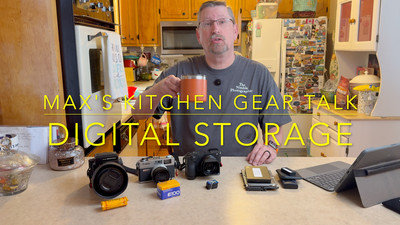
 Hey Everyone! Hope you've had a great week. This week's blog I want to talk about storage. Storage in your camera and storage for your computers. Now the price of storage whether it's a SD card or an External Hard drive or a new computer has skyrocketed because of AI and all of the server farms popping up to support it. Now that's another topic altogether. But prices are almost doubled what they were a couple of years ago. For example I bought a 1TB SSD external drive for my laptop a couple years ago for about 80 bucks that same drive cost over 250 dollars now. I recently had one fail and I'm still searching for a replacement. SD cards are the same I bought 2 128GB USH II cards for 40 bucks they now are well over 100 bucks. So prices are crazy! So today I want to talk about storage in your camera and at your computer. Let's start with the camera.
Now I'm going to get a little nostalgic and start talking about film. In the film days film was your medium and storage. Thirty six shots was the biggest roll you could get unless you rolled your own film. (Yes that was a thing in the day) These days we can put a 512gb card in your card and spray and pray and not run out of room. Now I think that that is taking away from your photography. I can understand if you're a wildlife or a sports photographer but for a portrait photographer or a travel photographer ? I don't think that is necessary. I've watched instagram reels
where a guy is taking portraits of strangers on the street and he's doing the "Spray and Pray" method. Is he a photographer or a videographer? For most of us shooting with a 64 or even a 32 gb card is enough for general photography. And those old cards that you've replaced will work great for photography. Now video or wildlife/sports is a different animal. You usually need a fast and large capacity card. I only have a few of theses cards and save them for video. I think that shooting with smaller cards and shooting with intention will make you a better photographer. It makes you work for the shot. I have a lot of old SD cards ranging from 2gb to 64gb and with my Sony A6700 with a 26mp camera and I have made a chart of what I have shooting in RAW.
 Check out this link that will take you to my Youtube channel and Max's Kitchen Gear Talk "Digital Storage" video where I talk about digital storage in-camera and on your computer. Please Subscribe to the channel and like the video it doesn't cost a dime and helps the video be seen by other people like you.
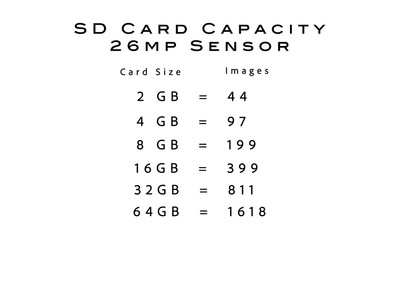
Now I was looking into buying some more cards but as you can see I can still get a lot of images from smaller cards. So I really don't need to buy more cards for photography only. Video and wildlife/sports would be a different matter. But for just general photography I have lots of cards that will work. I will only shoot a few hundred shots on a full day. On my last photography fall colors workshop 700 images was the highest daily count. But that was just because I was shooting street and shooting RAW+JPEG so really only 350 if they were single shots. So a 16gb card would have worked. I'm sure I had a 64GB card in my camera which would have gave me plenty of room. So my question is why are people buying those large gigabyte cards for photography? People buy 268GB and 512GB cards and unless you're a wildlife or sports photographer it's just a waste of money for photography. It's like shooting with a 60mp sensor to post to Instagram when Instagram is only going to show it as 1mp image. But large Megapixel sensors is a topic for another day. Just food for thought. So that's in camera storage but what about computer storage?
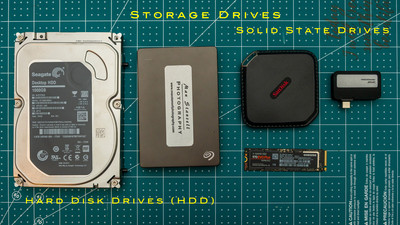
There are lots of ways to store your images at the computer level. That could be a whole blog in itself. From cloud storage to external drives to NAS (Network Attached Storage) For most of us it's on External Drives. These drives come in really two types Analog (spinning drives) Or SSD (Solid State Drives). By far the SSD is the fastest and safest to use. There are no moving parts unlike the mechanical spinning drives. As I have
 mentioned earlier SSD's have doubled in price the last year or so. My computer set up is that I bring my photo's into an external SSD do all of my editing and then I store the archived photo's on a Mechanical External Drive. That mechanical drive is backed up to the cloud. Mechanical drives will fail it's just a matter of when. SSD's are more reliable but can fail also as I found out on my Fall Colors workshop a couple of weeks ago. But to be honest it's the only SSD that I've ever heard of failing although I know they do. Mechanical drives fail more frequently and are slower and less reliable but they are a whole lot cheaper. I have a lot of these little drives that I used when I worked for a living. I've just pulled one out and I am thinking about using it for backup when I'm traveling until I can get a SSD again. I'm hoping that prices come down when all the server farms are built and there is more availability for the storage chips. I do have a couple of smaller SSD's that I can use when I'm on the road. How do you store your archive photo's and videos. I have one external drive dedicated to photo's and one for Video. As I do more video I may have to expand my archive storage maybe to a NAS but that's a long time away and I'm long in the tooth and that might not ever happen.
Storage is a very important topic for photographers that we don't talk about much at all. But we should. It's where all our art lives unless you print a lot . So just think about it a while and set out a plan to store and work with all your photo's. Until next week "Get out and Shoot!"
Hey if you want to check out my photography go to my instagram account Max Stansell Photography there are over 2000 posts there. Here is the link Max Stansell Photography Instagram Link
If you want to check out my YouTube Channel you can see it here Max Stansell Photography Please like the videos and subscribe to the channel. It doesn't cost you a dime and it helps the channel get to more folks like you.
