How I Video Myself #433
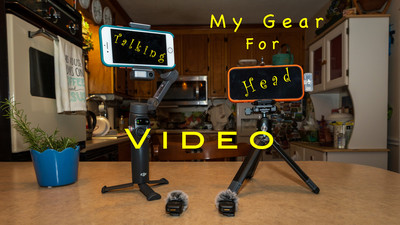
 Hey Ya'll! How's it going? Hope you've had a great week! This week I want to talk about how I video myself for my "Max's Kitchen Gear Talk" videos I've started to attach to my blogs. It's been a big learning curve for me because I'm not a video guy. I've got a lot of help from my Photography Wingman Robert on this topic as he is much more versed in the video world that I am. Before I get into the gear I wanted to get into the why I started videoing myself. Although I've written over 400 blogs I'm not much of a writer I try to write like I speak and sometimes it comes out okay but sometimes not so much. So I figured if I made a video I could better explain or at least get the punctuation in the right place. LOL I thought for the people that don't like to read maybe they will click on the link and I could talk to them about the subject of the blog. My main purpose of the blog is to share what little knowledge I have and my experience with
 photography and of course gear. (although most of my gear is old) So let's talk about gear. Most of my videos have been traveling type of videos whether I'm hiking , camping or riding my bike. For these videos GoPros and my Phone have been my main gear. They are nice and easy to use and all you have to do after you've got them set up is push a button. When I first stared doing hiking videos I had a little contraption that could hook to my hiking stick and I could put my phone on it and I had a selfie stick before they became a thing. This actually worked pretty well and the long hiking stick actually dampened the movement of walking and made it look smooth. This was before camera stabilization and I thought the videos looked okay. Then I got into GoPros and have been using them pretty much since. I keep it simple I don't shoot in LOG which is kind of like shooting in RAW where you would have to edit and color grade the footage. I kept it simple. I shoot in regular profiles or creative styles that the GoPro gives. Like shooting JPEG. All the editing is done in camera. Then I bring the footage into a simple program iMovie which is a simple program that lets you create your movie with simple drag and drop to add things like transitions and titles and music. The problem with GoPros is that you get that GoPro look. Very wide angle look. Not really good for filming a talking head video. So here's what I did.
Here is a video link to Max's Kitchen Gear Talk where I talk about the video gear I use. It is on my YouTube channel. Pleas like and Subscribe it doesn't cost a dime and it really helps the channel get seen by more people.
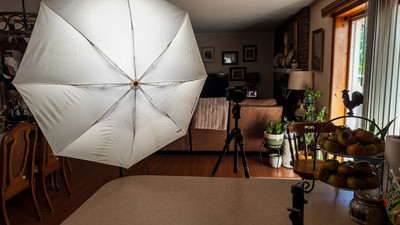
My first video of the series I used just my phone on a tripod. It worked okay. I used my apple watch to start and stop the video. I had some LED panels that I used to light myself. And I just started talking. I used the selfie camera on the phone (my first mistake) I got the video done and edited it and it looked okay but not as good as I wanted. The audio was also not good I had to boost it to 400% in post just to make it the right volume. My next video I flipped the camera around and used my watch to frame the scene and the video came out better but still not what I wanted. I also stuck an umbrella on the light to make it a bit softer and not as harsh. The video looked better lighting wise but still not as good as I wanted. Then I looked into the settings of the phone camera and found I was shooting in 1080 instead of 4K. So I
 changed those settings. But my audio was still bad. I went to my Wingman Robert for some advise and I also wanted to borrow a Mic from him. We went on a photo outing and he brought me a DJI gimbal for the phone and DJI mic mini combo to play with. Now you talk about a learning curve. It took me a couple of days to figure this combo out but after a little bit of research and practice I did figure it out. I redid the video that I had done before and it turned out pretty good and the audio was good also. It was a lot better! He gave me a great deal on the combo that he doesn't use anymore so I got it for myself. I also bought some more stuff too. I'm still keeping it simple but here's the gear that I'm using for my videos.
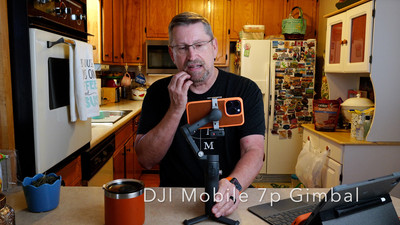
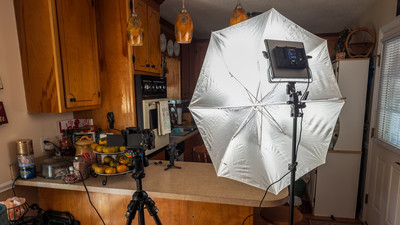 Video Gear- My main video camera is my iPhone 16pro. I shoot it in 4k and use the Normal camera on the phone. I use my apple watch or with the DJI gimbal I can use had gestures to start and stop the recording. I am using the DJI Mobile 7p gimbal on a light stand to hold the camera. What's nice about the gimbal is that I can start and stop with had gestures but I can also have the gimbal follow me with a hand gesture. It so sensitive that I sometimes have to cut off this feature because if it sees the gesture only for a second it will move the gimbal and follow me. With the gimbal I can hook up and link a DJI Mic Mini wireless microphone directly to the phone onto the video . This really works great and the microphone gives great audio quality and even has noise cancellation that can cut out distracting noise. Now that I've seen the power of these little mics I want to use them on my other cameras also. But the module that is used as a receiver for the gimbal will not work with other cameras. So I got a receiver and another mic that I can use to put on my Sony. I even got an attachment so I can connect to my GoPro and a mobile receiver that can hook to my phone so when it's not on the gimbal I can still use the mic. I'm very excited about the gear I have to use and have been experimenting and shooting more video than photo's lately. I would like to use my Sony camera more as a video camera and the mics will come in handy if I use it for talking head video. But I have found that shooting video with my Sony is more complicated than using a GoPro or phone. I'm still learning that now. I'm also still shooting in a basic way. I'm not color grading or doing any LOG shooting. Yet.
Maybe in the future I will get a fancy program like Final Cut Pro and stop using iMovie. But for now I'm
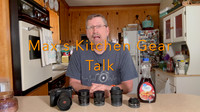 going to keep it as simple as I can. But I'm sure in the future I will try to advance my video as well. If you are interested in watching the videos they are on my YouTube channel Max Stansell Photography. You can look at the playlist and there is one for "Max's Kitchen Gear Talk". You can watch the other videos also. I'm told that if you have trouble falling to sleep watch one of my hiking videos. LOL You can also subscribe to my channel and get notified when the videos come out. Hopefully you will see the progression in video quality. So until next week "Get out and Shoot" Video!
Hey if you want to check out my photography go to my instagram account Max Stansell Photography there are over 2000 posts there. Here is the link Max Stansell Photography Instagram Link
If you want to check out my YouTube Channel you can see it here Max Stansell Photography
