How to backup while traveling. #366
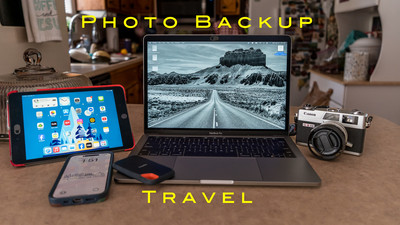
 Hey Ya'll! Hope you're having a great week! Me? Not too bad thanks for asking. This week I'm getting ready for a week long trip and of course I want to back up my photo's when away. So this blog is going to be about backing up while traveling. When traveling you want to be as lightweight as you can. Not lugging around heavy camera equipment or heavy computer. Lots of people use their Laptop as their main computer not only for editing photo's but for everyday stuff paying bills, banking and all of their stuff on the same laptop that they edit on. Wouldn't that be terrible to break or to have stolen with all of that info and photo's on it? It would be a disaster and ruin your trip. Most of my editing are on a mac mini desktop computer but when I go mobile I don't bring that setup. Here I will go over different ways to back up your photo's when out on a trip that you do photography on or even a vacation that you take your camera with you and you want to save the memories from the trip. I like to have at two copies of my images when traveling and keeping them in different bags incase one gets stolen or lost that way I don't loose my images.
SD Card: The first line of defense is my SD card. I have a new SD card every day and the info on the older
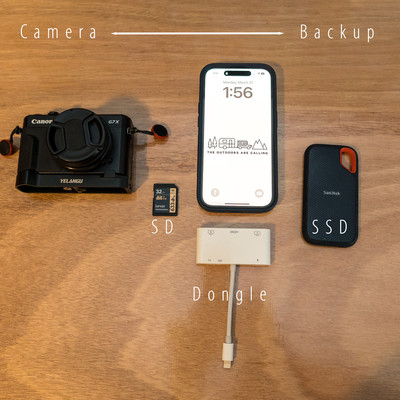 card is saved as one copy. So if I'm going on a 7 day trip I'll have 7 Cards. I know that sounds like a lot but I'm still using older cameras where the SD cards don't cost much and I buy a few every time they go on sale. I know the newer high capacity newer cards cost a lot more money and may not be feasible to do but that's what I do every day new card.
SSD External Disc-The next thing you will need is an external disc drive. Small disc drives are easy to cary and can hold lots of photo's and video. I would recommend a Solid State Drive (SSD) A SSD drive is better than the older disc drives because there is no moving parts that could fail like in the older drives. This is the drive that you would copy all of your photo's from each day. I have a 1TB drive but you can get them in any size. The larger your file size or your sensor the larger the drive because the file size of the larger megapixel cameras take up more space.
Laptop: Now you could use a laptop but I wouldn't recommend if it is your main computer. I am really not a laptop guy but I bought a used laptop from a friend that upgraded to a newer model and I got it fairly cheap. It's a 13 inch laptop lightweight and I got it just so I'd have something to use when I have to run a Camera Club meeting. My old laptop was too weak to do this. I will be taking this on my next trip but just because I don't have much money into it and wouldn't be crushed if something happened to it what I would recommend is the next two options.
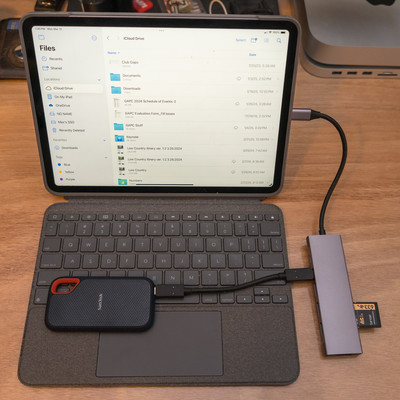 Dongle: A dongle is something that sticks into your laptop, Tablet or phone. It's used to transfer files , upload or just give you a connection to hook another device to your laptop, Tablet or phone. It will have different ports on it from USB-C, USB-A, HDMI, SD card, so whatever you have will plug into and connect to your device. They are inexpensive and really come in handy.
Smart Tablet: I have used a smart tablet to do a lot of trips to edit and to backup my photo's. The way it works is you hook a dongle to the tablet (must have the correct port for your device) Once it's hooked up you attach your SSD drive to dongle and SD card to Dongle . Then you can use the "file App" on your iPhone (Android has the same thing) and you can copy files off of your SD card and put them on a file on Your SSD Drive. I usually have a file named Day 1, Day 2, etc... It usually takes just a couple of min. and you will have backed up your SD Card onto the SSD Drive. Once it's there you can view the files on your SSD drive and pick the one you want to edit and download to your tablet and edit. I wouldn't recommend downloading to the tablet itself filling up your memory . Then you can easily post to social media from your device.
Phone: Using your phone is probably the most convenient way to do it. Just like the Smart tablet you just use
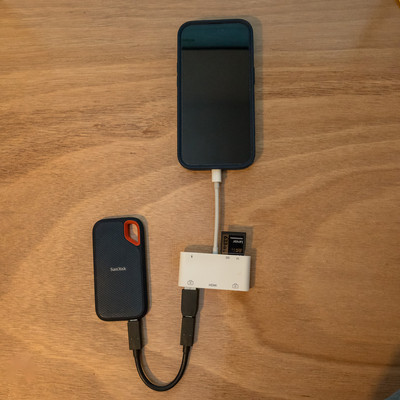 your phone instead of the tablet with the dongle and everything else is the same. The great part about this way is the only thing that you've added to your travel gear is the SSD drive and a Dongle that will fit your phone. Easy Peasy! No extra equipment or stuff to lug around an airport. Many photographers use this method when they travel. The only drawback is the size of the screen when you edit. But you could totally used to backup your images.
I have taken small trips where the phone was the only device I took with me but usually it's a tablet that I would take because I like the bigger screen but the process is the same. Easy ways to backup your photo's when traveling so until next week Get out and Shoot!
Hey if you want to check out my photography go to my instagram account Max Stansell Photography there are over 2000 posts there. Here is the link
Max Stansell Photography Instagram Link
