Backblaze Saved My Butt Today #382


What's up Ya'll? Hope you've had a good week! My week has been going good this week until today. Today when I turned on my computer I saw I o
nly had 30 gig of storage left on my hard drive. So I decided to clean it up. I had just edited a video in iMovie and that uses lots of storage so I wanted to delete the library of iMovie. So I did and that cleared up over 100 gig of storage. I went to my Lightroom catalogs and deleted all of the old ones and that saved a lot of storage. Then I messed up. I started deleting files out of my working drive forgetting that I haven't moved them in Lightroom to another drive. Not thinking I went to the trash can and click, click emptied it and then I released that I still needed those files! It was a few months worth of photography that I didn't want to loose. So now what to I do? Well I started Googling and I remembered I have BackBlaze Cloud service. Which means they are always backing up my main computer and everything that is hooked to it. So that's where my files were. But how do I retrieve them. I know it can be done but I've never done it before.
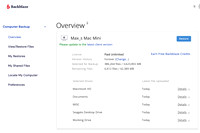
My first step was to go online log in and see if the files are there. It took a little bit and I had to find user name and password. (Don't sign in that
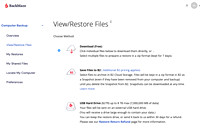 much) . Then it was to navigate the site and I found where I could look at my backup and pick what files I wanted to retrieve. Whew! They were there ! What a relief that was. So how it works they can create a .Zip file that has all of your stuff you want to retrieve and send it to you. The amount of data that I had to retrieve was 75 gigabytes . Whew! So you press a button on the website and it starts to create the zip file. It can take a while. They email you when it's done. So I went about my business and a little while later I checked my email and it said that the .zip file was ready to be downloaded.
 Downloading the .zip file isn't as easy as you may think. It's a big file. So they have a program you can download to your computer that downloads the file quicker than it would be if you just use your browser and down load it into your download folder. So I downloaded the program and it was pretty easy to use. You sign in and it finds the file for you. You can then pick the place on your computer that the files came from and down load straight to that place. Which I did. Depending on the size of your file and the speed of your internet will determine how fast it downloads. My file took about 30 minutes to download. Once I had it downloaded I just right clicked the file and unzipped it. And it put all of the files I had accidentally deleted where they needed to go. I did move things around a little to make sure they were as Lightroom had placed them in the beginning . After that I opened up Lightroom and all of the folders populated like nothing had happened. Whew! Then I relocated the files using Lightroom to a disc away from my hard drive of the computer. Whew! Mission accomplished!
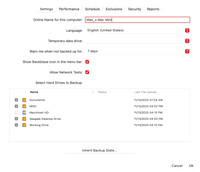
I have had Backblaze for quite a few years now and this is the first time I really had to us it to recover lost files. It runs in the background and it automatically renews itself every year so I barely know it's there. I actually forgot about it until now when I needed it. And it worked like a champ! If you are looking for a cloud backup solution I highly recommend Backblaze! So until next week Get out and Shoot!
Hey if you want to check out my photography go to my instagram account Max Stansell Photography there are over 2000 posts there. Here is the link
Max Stansell Photography Instagram Link
