Holiday Photo's #387

December 12, 2025  •  Leave a Comment

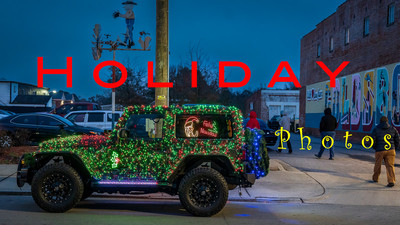
Hey Everyone! Hope Ya'll are having a great week! Me? Pretty good! It's Holiday season and I'm officially in the mood! Usually it take until Thanksgiving to get me in the mood and this year was no exception. I don't want to see holiday movies, or hear music holiday related until we've eaten the turkey. But now that we have I'm in the mood. I've been working on my Van getting it ready for next years adventures but its been especially cold the last week or so and I haven't done much but purchase things for it while the sales are still in effect. A update will come in next weeks Blog.  This week I want to talk about holiday photo's. To me they are some of the most fun to take . Everybody is smiling , even family! LOL They are a great way to share with family and friends and save memories of times. Looking back in old shoe boxes of photos they are always of family gatherings . Weddings, holidays, birthdays and the such. So just because you're shooting digital now doesn't mean you don't need to document the occasion with photo's . Even if they are only with your phone.

Community Events, During the holidays there are many events going on in the community to celebrate the season. Of course there are Christmas/Holiday parades. This is like capturing joy. Everyone is happy and having a good time. All you have to do is point a camera at folks in the parade and the smiles automatically come. Children are having some of the best memories in their little lives .  Fun is had by all! All you need to shoot these events is a camera and a medium zoom. If your parade ends at darkness like ours does a 50mm with a wider aperture works great also. And it's not just Parades there are tree lighting ceremonies , downtown lights, concerts in the park and whatever your community does for the holidays.  It's a special time to photograph. Don't forget your town's store fronts. Lots of store owners go to great lengths to make their store front the most beautiful. Christmas decorations of all sorts are out. When I was a kid we always went out to see the lights. Going in neighborhoods that had elaborate lighting decorations on their homes. These are also great opportunities to get some great shots.

Photographing Family and Friends, Thanksgiving and Christmas are great times to get family portraits, Group shots and candid shots of family. Remember you as a photographer of the group is responsible for documenting the event and occasion. Sharing these photo's with family and especially if they save or have them printed is a great way for younger folks in the future to see family members all together having fun before they were born. To see family members that aren't with us anymore is really nice. Another idea is to make books out of the holiday. Like Thanksgiving of 2025 and give as Christmas presents to everyone. That way they have permanent copy of them. Whatever you do don't miss this opportunity to get some great and lasting memories of your family.

The holiday season is a great time for photography. I hope you have a chance to enjoy the holidays with family, fun and photography! Until next week Get out and shoot!

Hey if you want to check out my photography go to my instagram account Max Stansell Photography there are over 2000 posts there. Here is the link

 Max Stansell Photography Instagram Link


Paring down my Cameras? #384

December 05, 2025  •  Leave a Comment

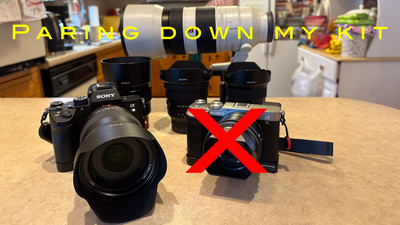
What's up Y'all? Hope you're having a great week. Me pretty good! This week will be a little different . Usually I'm buying something or getting something new but this week I'm getting rid of something. Now I have changed my camera set ups many times. I've gone from a film shooter to a digital shooter from a Nikon full frame DSLR to a Sony crop sensor Mirrorless camera and back to Full frame Mirrorless and film again. So kind of full circle. Now I have two full frame mirrorless camera's. Both are basically the same . Same sensor and everything but one is a compact size and one is more professional traditional camera. Well I was finding problems on when to use this camera or that camera and what lenses to use just too many choices. So one or the other camera would just sit at home depending on what mood I was in. What a waste. So I needed to get rid of one. So now which one?

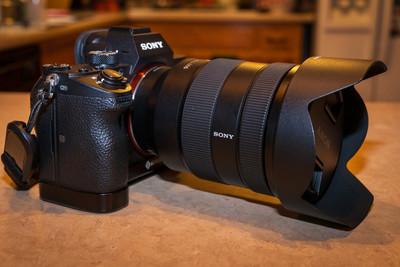
Both of my camera's are Sony full frame Mirrorless cameras. One is a A7III which is the more traditional camera with dual card slots a larger electronic view finder and is very robust. It's the one that I use for wildlife and landscape photography. I have 3 main lenses that I have talked about in the past the 16-35mm, 20-70mm, and the 70-300mm zooms which I love them all. I also have the A7C which the "C" stands for compact. It is built in a range finder style and is more compact than the A7III. It's great for travel and street photography with its low profile and I recently used it on a Colonial Williamsburg workshop where it worked great and gave me excellent photo's. For the compact camera I have one zoom a 28-60mm to compact primes a 35mm Zeiss and a 50mm.  Both which I love. The knobs and switches are a little different on each camera so when I go from one to another I have to relearn what switch does what. That slows me down a little. And since both camera's have the same sensor and megapixel count I really need to pair down to one camera. But which one? Well I had to make a decision and I'm going to keep the A7III the more traditional camera and letting the compact go. The main reason really came down to the electric view finder. The one on the A7III is larger than the one on the A7C the compact version which has a small one. And with older eyes the larger one won out. So now I have to decide what else I will get rid of. I decided on the 28-60mm will have to go also because it is in the same range as my 20-70mm zoom which is the better lens. 

Selling the cameras was easy for me. I sold them back to MPB which was where I bought them from to begin with. All you have to do is let them know what you're selling and they give you a quote. Package them up and they send you the label to ship them with and then you take them to a Fed X store and send to MPB. When they receive them they inspect them and make sure they are okay and then they send the money. I originally bought the A7C for 1100 dollars and I sold for 900 three years later. Not too bad. 

Now that I've paired down I only have one system to think about. If I need something small I can always use my little Canon point and shoot that I love for that kinds of stuff. So there you have it I have paired down my Camera's to just one system . So until next week Get out and shoot ! 

Hey if you want to check out my photography go to my instagram account Max Stansell Photography there are over 2000 posts there. Here is the link

 Max Stansell Photography Instagram Link


New Project Travel Van #385

November 28, 2025  •  Leave a Comment

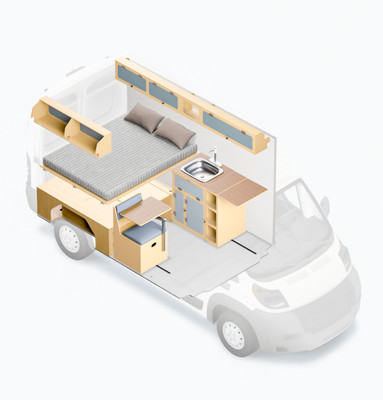
Hey Ya'll! Hope you're having a great week. Me? Busy ,Busy ,Busy! I know this blog is basically a photography blog with some hiking maybe thrown in but today I want to start a new direction that I'm heading toward. It's converting a van into a camper van so my wife and I and of course Forrest the Wonder Dog can take trips around the country and see all of the wonders that this great nation has to offer. Now we have always been campers and we started like everyone else did in a tent then as we got older we moved to a little pull behind tear drop camper which worked great. But for quite a few years I have had my eye on camper vans. You've seen the cool photos of people living full time in their vans on Instagram or Facebook. Well I don't want to live full time in a van. But I do think that they are the perfect road trip vehicle. You can drive until you get tired stop somewhere (campground preferably ) pull into a camp site and you're done. No setting up to do because everything is in the van. Oh sure you could cook outside if you wanted to and we probably will most of the time but that's just taking one thing out of the van. With a pull behind camper you have to do a lot of set up after you get to camp . Usually you have to get a RV site with water and electricity hookups which cost more per night and are usually booked months in advance. But with a van you can pull into a tent site and you don't need the water or the electric for a over night stay. With a camper van you have your bed with you , your kitchen with you, AC and fans everything is in one neat package that you don't have to set up. When you leave you don't have to pack up either. Just get in and go to the next location.

I have been talking about vans with my friends for years saying how I would love to have one but they can be very expensive. Especially if you get one that is already decked out with all the nice stuff inside. They can cost well over 100,000 dollars up to 200,000. Max don't have that kind of money! So I've always said they were made out of Unatanium. Because they were unattainable. But I've always loved them. When my wingman Robert and I went on our big Utah trip a couple of years ago I was pointing them out and they were everywhere. We pulled into the parking lot of Capital Reef National Park Visitor Center and I counted over 20 of them all parked in a row. All shapes and sizes but there they were. I was green with envy of those folks traveling around the US and all of the adventures they would have. Recently I came upon a company (Wayfarer Vans) that would convert your van (New or Used ) for 25,000 dollars. And this got me thinking I could buy a used van and take it to them and for less than 70000 I could have a nice but used Travel Van. But then there are the add ons. The basic package was 25000 but if you want a fridge that's extra if you want AC that's extra if you want exhaust fan extra and the list goes on by the time I was through it was over 40 grand for the up-fit. So I started the hunt for a used van. So if I got one for 30,000 plus the 40 for the up-fit I'd have 70000 into a used van. Thats A lot for a used vehicle . I could find vans but they were construction vans with lots of miles on them and not many options like cruse control. But I kept looking and I found a van! But it wasn't really used.

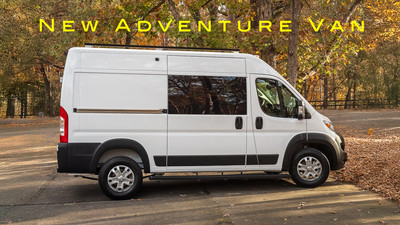
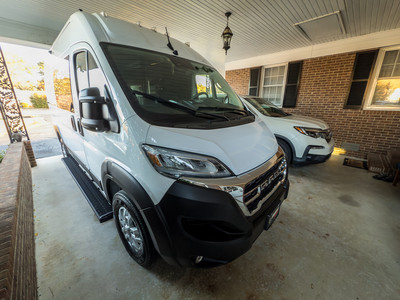
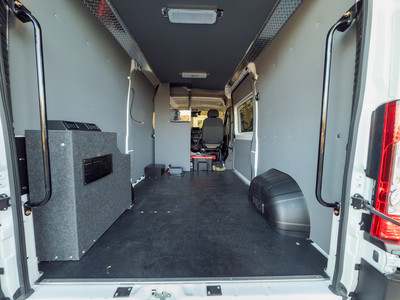
The van I found was a 2025 Ram Promaster  It had 300 miles on it. Not 300,000 but 300 only. It had been up-fitted to be some sort of office. It had a walls and floor and ceiling already installed. It did have a desk and chair bolted to the floor. It had a house battery and inverter so they could plug in a computer I guess it even had a AC in the back. It had a window in the sliding door and windows in the back doors. Those are hard to find on a contractor type van and usually have to be installed later. It has running boards to step onto. It had options like a car on the inside. All of the safety stuff and sensors around the vehicle. It had the 360 view installed with a video camera for the rear view mirror that shows a top view of the van and is great for parking and driving in traffic. So it had a lot of stuff already done to it. So I went to take a look at it and would play let's make a deal if I liked it. So I did and I did play let's make a deal and everything went my way. I got a van! My little Max Mobile that I was driving went to my granddaughter so she would have a safe car to drive back and forth to college in. So another plus. I've had the van about a week and I've got the desk and chair out of the van. I've got the extra house battery and inverter removed. I got a hitch installed their cost. ( wheel and deal). 

Instead of having Wayfarer Vans install everything I'm going to be doing the install myself. I'll fabricate a bed but everything else I'll buy and install myself. I've figured out the cost will be about 8 grand for all of the parts and I will install myself. So that's a big savings from 40 grand to 8 grand. It will take me a while to get it ready for adventure. I'm hoping by Spring It will be ready if everything comes together. So stay tuned for updates on how the progress goes. Until Next week get out and Shoot! 

Hey if you want to check out my photography go to my instagram account Max Stansell Photography there are over 2000 posts there. Here is the link

 Max Stansell Photography Instagram Link


My Mobile Computing is about to Change Again! #383

November 21, 2025  •  Leave a Comment

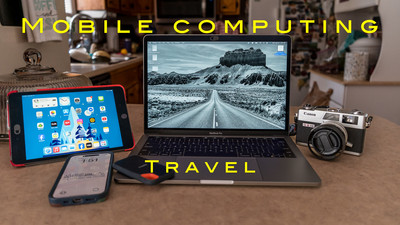
Hey Ya'll! Hope you're having a great week! Mine has been pretty good with good weather and a little hiking and bike riding. I finished a week long photography trip to the Georgia mountains. This week I want to talk about my travel backing up and editing workflow. It has changed again. I have written many blogs on my travel workflow and it's ever evolving . I used to have Lightroom Classic on my mobile computer and would export a Lightroom Catalog  and merge with my main catalog. I've tried using Lightroom CC the mobile edition and it used up storage on my Adobe Cloud. But over the years the Lightroom Desktop formally Lightroom mobile and Lightroom cc has changed a lot. The older versions you had to use the cloud but the newer versions you can use your local drive to edit. This have been a game changer for me. I'll explain why....

My main computer is a Mac Mini at home with a 27 inch monitor and Apple M2 chip. Works like a champ and I have no problems using it. My 2563e370f98e53afa59b4ddfed93f6212563e370f98e53afa59b4ddfed93f621 mobile computer has changed many times from Lap top to iPad Pro back to a MacBook Laptop again. Last year I bought a used MacBook Pro from a club member. It's rather old but would let me use Lightroom and run club activities if I needed to take the place of the President if she wasn't present. Lightroom Desktop (Not Classic) Uses less computing power and runs better on the old MacBook . It's slow but it works. So now that the Lightroom Desktop can run on local drives this makes it very easy for me. My backup of files hasn't changed that much. On a separate Solid state drive I have a folder labeled SD backup. Inside that folder I have folders named Day 1, Day 2, Day 3 etc... Then each day I take my SD card out of my camera and backup the files to the correct day. Then I take that SD card and put it a card wallet and take a new formatted SD card and place in my camera ready for the next day. So I have two copies one on the drive and one on the original SD card in the card wallet. I also keep both of these in separate bags when traveling incase I loose a bag I haven't lost my photos. I can then edit all my photo's off of the external Solid State drive.

My editing has changed. Like I said before I went from Lightroom Classic to the Lightroom Desktop on my Mobile MacBook. I used to only edit a select few photo's while on my trip because it took up so much storage on the cloud. But now you can make edits on a local drive I can do all I want. All the edits are saved and when you get home you can take that Solid State drive and Import the photo's into your main catalog and all of the edits that you have done while on your trip will be in your main catalog also. This is awesome! So on my last trip although very slow my computer (a 2017 MacBook Pro) worked well. I was very pleased with my setup. When I got home there was an update to Lightroom version 9 it added some neat importing and culling features and some dust removal that I was really interested in. So I updated it on my Main MacMini but when I went to update on my old MacBook it wouldn't update. It said my operating system was too old and I have the latest version that can be loaded to the MacBook. What that means is I need to update the old MacBook. I knew when I got the MacBook that it was just temporary fix to my Laptop Problems . So I need to update my Laptop to run the most current Lightroom. Well luckily MacBooks last a long time. I'm typing on a a 2017 which is pretty old for computers. I just sold a camera so that will help fund a new computer. I will get the biggest and baddest computing power Laptop that I can afford to future proof the Laptop. I'll give a review to it and what I got when I purchase it . So the biggest actually workflow that changed is working on my photos on a local drive instead of the cloud. I'm kind of looking forward to it and kind of dreading it. I'm dreading the price but will be glad of the speed it will work. What I'm really sad about is all of the stickers I have on the Laptop I have now. Maybe I can take some of them off and transfer them to the new computer.  Well till next week Get out and shoot! 

Hey if you want to check out my photography go to my instagram account Max Stansell Photography there are over 2000 posts there. Here is the link

 Max Stansell Photography Instagram Link


Backblaze Saved My Butt Today #382

November 14, 2025  •  Leave a Comment


What's up Ya'll? Hope you've had a good week! My week has been going good this week until today. Today when I turned on my computer I saw I o
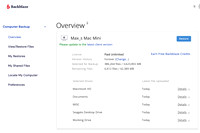
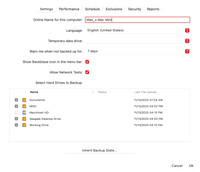
nly had 30 gig of storage left on my hard drive. So I decided to clean it up. I had just edited a video in iMovie and that uses lots of storage so I wanted to delete the library of iMovie. So I did and that cleared up over 100 gig of storage. I went to my Lightroom catalogs and deleted all of the old ones and that saved a lot of storage. Then I messed up. I started deleting files out of my working drive forgetting that I haven't moved them in Lightroom to another drive. Not thinking I went to the trash can and click, click emptied it and then I released that I still needed those files! It was a few months worth of photography that I didn't want to loose. So now what to I do? Well I started Googling and I remembered I have BackBlaze Cloud service. Which means they are always backing up my main computer and everything that is hooked to it. So that's where my files were. But how do I retrieve them. I know it can be done but I've never done it before. 

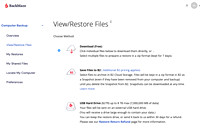
My first step was to go online log in and see if the files are there. It took a little bit and I had to find user name and password. (Don't sign in that much) . Then it was to navigate the site and I found where I could look at my backup and pick what files I wanted to retrieve. Whew! They were there ! What a relief that was. So how it works they can create a .Zip file that has all of your stuff you want to retrieve and send it to you. The amount of data that I had to retrieve was 75 gigabytes . Whew!  So you press a button on the website and it starts to create the zip file. It can take a while. They email you when it's done. So I went about my business and a little while later I checked my email and it said that the .zip file was ready to be downloaded. 

Downloading the .zip file isn't as easy as you may think. It's a big file. So they have a program you can download to your computer that downloads the file quicker than it would be if you just use your browser and down load it into your download folder. So I downloaded the program and it was pretty easy to use. You sign in and it finds the file for you. You can then pick the place on your computer that the files came from and down load straight to that place. Which I did. Depending on the size of your file and the speed of your internet will determine how fast it downloads. My file took about 30 minutes to download. Once I had it downloaded I just right clicked the file and unzipped it. And it put all of the files I had accidentally deleted where they needed to go. I did move things around a little to make sure they were as Lightroom had placed them in the beginning . After that I opened up Lightroom and all of the folders populated like nothing had happened. Whew! Then I relocated the files using Lightroom to a disc away from my hard drive of the computer.  Whew! Mission accomplished!

I have had Backblaze for quite a few years now and this is the first time I really had to us it to recover lost files. It runs in the background and it automatically renews itself every year so I barely know it's there. I actually forgot about it until now when I needed it. And it worked like a champ! If you are looking for a cloud backup solution I highly recommend Backblaze! So until next week Get out and Shoot!

Hey if you want to check out my photography go to my instagram account Max Stansell Photography there are over 2000 posts there. Here is the link

 Max Stansell Photography Instagram Link


Subscribe
RSS
Archive
January February March April May June July August (4) September (4) October (5) November (4) December (3)
January (5) February (4) March April (2) May (1) June July August September October November (3) December (2)
January February March April May June July August (1) September (1) October (1) November (1) December (1)
January (1) February March April May June July August September October (3) November (2) December