Tiny Sensor Cameras #399

March 06, 2026  •  Leave a Comment

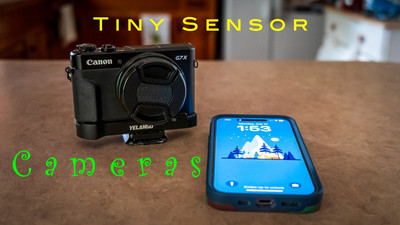
Hey Y'all ! Spring is just around the corner and things are starting to warm up! Hope you're having a great week. People often ask me how I come up with subjects for my blogs. Sometimes it's something that I'm working on or something I'm thinking about but sometimes it's stuff I hear on podcast. One of my favorite one to listen to is the Digital Story by Derrick Story.  That's where I got the idea for this blog is from his latest podcast Tips for small sensor photography. Please start listening to his podcast he has over 1000 of them with all kinds of topics.  Now for this blog. Tiny Sensor Cameras. We all have them. 

My tiny sensor cameras. What do I consider a tiny sensor camera? Well I guess anything that is smaller than a full frame sensor camera. Most of my time taking photo's has been with smaller than full frame sensor cameras. I have shot crop sensor cameras for quite a while and have just recently gone back to full frame again. Most of the photo's on this website that I have in my galleries are shot with crop sensor cameras. I like smaller sensor camera's because they are usually smaller and just fun to shoot. I have a small Canon Point and shoot that I love to shoot. I got it when my wife and I were going to Washington DC  for a week long trip and I didn't want to take a big camera with me while I was with her but I still wanted a dedicated camera. I got some fantastic photo's! I was very pleased. Of course I have my iPhone 16 pro that is with me all the time and it can take some great photo's also. So if you have a phone you have a tiny sensor camera .  Don't be afraid to use it. It's good for something more than just taking selfies. You can get great pantographs and macro and these cameras are great for street photography because no one really pays attention to someone using a phone to take a quick shot. Hey what about action cameras? Some of us use these little cameras to take video of our adventures but you can also use them for photo's also. Or you can grab a frame out of a video and make a photo out of it. Some of them really turn out good . I have used these for thumbnail photo's for YouTube videos that I have posted online. You can get unique angles and even under water shots from these cameras. 

Tips on using tiny sensor cameras. When using tiny sensor cameras you should use the same basic camera techniques as you do with your big sensor cameras. Holding the camera securely when taking a photo just as you would with a big camera. Slowly squeezing the shutter button not just jerking it down. Make sure the auto focus point is where you want it and it is in focus before pulling the trigger. I would suggest stopping down a stop or two from the lens maximum aperture for best focusing results. When doing a landscape shots I go old school and focus 1/3 into the scene and let the hyper focal distance do the work for you. Make sure that your shutter speed is at or above 1/60 seconds. Control your ISO keeping it as low as you can to help with noise in the shot. These are basic shooting principals that you should use with any camera you shoot. I also use external filters on my point and shoot camera. A polarizer or a 1/4 defuser filter works wonders for photography shots. I use a K&F 1/4 diffuser and polarizer in one that I got for 22 bucks off of Amazon. It works wonders and makes your shots look more film photograph like instead of being super digital looking. Smaller sensors are more prone to noise especially in lower light. Now these camera's have smaller megapixels than their big sensor brothers. Maybe only 12 or 20 but don't let that slow you down. If you get a shot that you want to print large you can use post processing to increase the size of the photo's resolution and make them great for print. Also if there is a little noise you can use de-noise in lots of programs to clear that noise up. 

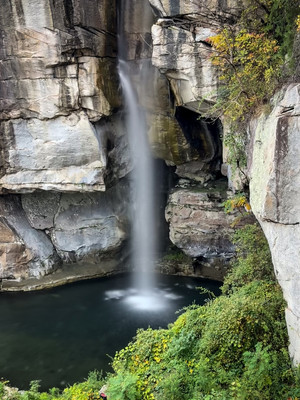
Now are these little cameras as good as their big brothers. No they are not especially if you pixel peep at 200 percent. But how many photo's do you look at 200% when you're looking at photos online or in print? These little cameras are fun to shoot! I mean really fun. Lots of these little cameras have all kinds of cool and fun settings and film simulations on them that make them a blast to shoot. Another thing you can do is shoot in RAW + JPEG . When you do this you have the Raw image that you can do almost anything you want but when you also are shooting in JPEG which does processing for you also makes lens corrections to these little cameras that could make them more sharp. Sometimes I use the JPEG just as it came out of the camera and it looks great and other times I like to use the RAW so I can do more editing on it.  As you can tell I am a big fan of these little sensor cameras and use them a lot. You don't have to go out and buy a little sensor camera use your phone you can get some great shots out of them and can put all kinds of effects even long exposure. When I'm out doing water falls I like to take one with my phone and I can use the long exposure effect and can get dramatic dreamy water. We have a lady in our camera club that takes great photo's with her phone and I am always impressed on what she can come up with. Well that's enough of me for this week . It's warming up outside so Get Out and Shoot! A small sensor camera! 

Hey if you want to check out my photography go to my instagram account Max Stansell Photography there are over 2000 posts there. Here is the link

 Max Stansell Photography Instagram Link


Adventure Van Update " Cabinets and Galley" #397

February 27, 2026  •  Leave a Comment

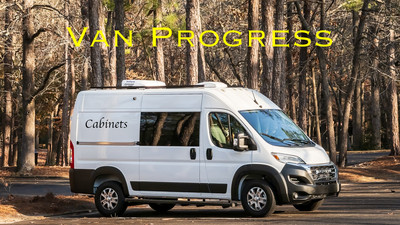
Hey Everyone! Hope you are having a great week! Me? Pretty Good. Today's blog is an update on my van conversion. If you don't know I've purchased a Ram Promaster Cargo Van and am converting it into a Camper Van or as I call it an Max's Adventure Van or "MAV" for short.. The last update was on the floor install of the van I've already done the roof work with AC and exhaust fan install. (the scary part of the install) I have made quite a bit of progress since then and thought I would give you a update. I'm writing this blog from the van itself! I'm watching the Olympics on my iPad and am writing my blog as I will when I'm on the road with my new MacBook Pro . The weather has been very cold since we last talked about the van and finding temps that I can work in have been far and few between. The cold weather has really bothered me more this year than I can remember. Maybe it's been colder but I think it's because I'm older. At any rate it's been cold and days that I can work in have been scarce. This week it has warmed up quite a bit and I have made some significant progress. So let's talk about it.

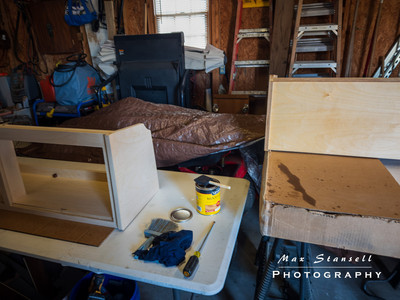
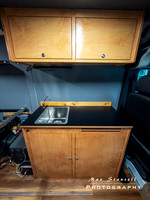
Furniture Assembly and Prep. I purchased two above head cabinets from a van conversion company. They supply all the parts and they are computer cut so you can assemble. They are rough cut so they need lots of sanding. They are made of Baltic Birch plywood and are cut to fit the Ram Promaster that I have. Different vans manufactures have different shapes on the insides. The boxes that the furniture came in were heavy I had to have someone help me take them to the garage where I was going to do the work. They had been in the house waiting for a good day to work on them. The first order of business was to sand the different parts. Lots of parts! I did the cabinets first. Sanding took a full day. After sanding I dry fitted to make sure everything went together. Then there was the staining. I decided to put the cabinets together before staining and that might have been a mistake but that's what I did. After both cabinets were together I started the staining. The wood was pretty white and wanted to darken up bit. I went with Colonial Maple for the color . I let my wife pick out the color as my eyes don't see shades of colors well. So staining is not only the outside but the inside also. Then it was time for the galley I did the same process as the cabinets. The cabinets took one day and so did the Galley. Now it was time for polyurethane. I wanted to put at least 3 coats on the Cabinets and Galley. On the inside I opted for only one coat but the outsides and the cabinet doors got three on both sides. But the weather had turned cold again and my garage doesn't have heat so I decided to bring everything inside to put the poly on. I was using water based polyurethane so there was no smell. It took two days to do cabinets and galley. They were ready to install now I just had to wait on the weather to install them.

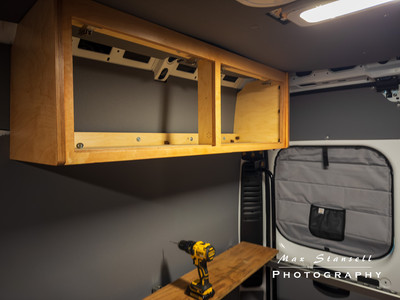
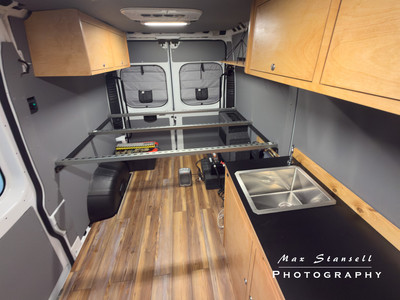
Installation of Furniture. Well it took a couple of weeks an Ice storm and a Snow storm and we don't really get those types of storms here in the south. So I was trying to wait patiently with not much success . I was always checking the weather and then a week away I saw a couple of days that would be warm enough for me to work in. When the days came I took the cabinets to the Van and my wife helped me with the galley to get it into the van. I was going to have someone help me with the cabinets but that didn't work out. So the first one I installed by myself. It was all I could do was to hold the cabinet in place and screw the cabinet into the van. Now there are supports like ribs that go around the van for support and I attached the cabinet with metal screws to secure the bottom part of the cabinet and on the top early on in the process I installed some supports that I could screw the cabinets into. I did have to have my wife help me on the other cabinet because I was wore out holding with one hand and using a drill with the other .  Installing the galley was a little easier  ( no lifting) but the way it sat against the wall there was a gap. So I installed a back splash board that covered up that gap. It's a 3/4 inch board that I sanded and stained and polyurethaned to match the cabinets. I Secured to a support on the back half and screwed the galley to the floor. With the galley there was also the install of the sink and water pump and water storage tanks and faucet all which were supplied with the kit. Also the original galley was made for a upright college sized fridge but I didn't want that so they gave me a cabinet door and shelves to go on the inside for storage which every van lifer knows is very important.

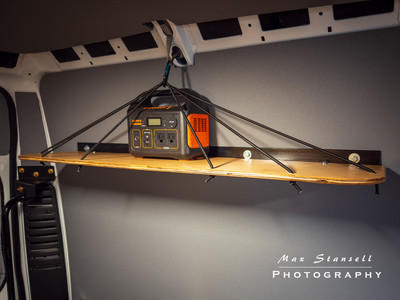
Shelf fabrication and install. At the foot of the bed will be cabinets for clothes but at the head of the bed there will be a shelf where we can charge our phones at night and during the day we can store bedding. I saw a shelf design that I liked and decided to use it. When installing the bed rail supports early on in the process I also made a support for the shelf and it's been looking at me for a while. Now I'm not great at wood working or making things pretty. That's why I bought cabinets that had been thought out and designed by someone else but a shelf is just a piece of wood right? So I went to Lowes and got some 1/2 inch birch and made a board 43 X 10 inches. I rounded off the front corners of the shelf by using a gallon paint can as my template so at least they would match. I didn't want any sharp corners so I used a 1/4 inch router bit to round off the edge. I then stained and polyurethaned it like the cabinets and galley. I marked and drilled the mounting holes and installed to the support bracket I installed earlier in the build. I also drilled six holes prior to installing it that I will run bungee cord through. Bungee cord goes from the shelf through a carabiner that is secured to the roof of the van and then the bungee goes back to the other side of the shelf. I did this two more times to create a bungee cord system that can be used to hold bedding during the day. By bedding I mean sleeping bag or blanket. It actually turned out pretty good and even my wife liked it.

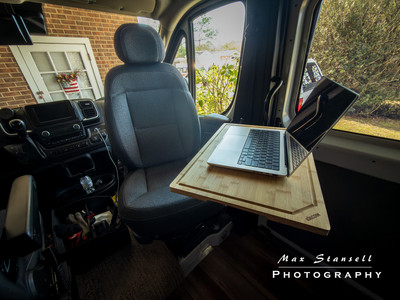
Lagun table install. You might not know what a Lagun table is but it's a table that can hook to the side of the van and can be adjusted up, down and side to side. It was made popular in marine installs and the van folks picked it up and ran with it. I have it so I can mount it to the side of the passenger seat and have a table when the chair is swiveled around facing the back of the van. It's the table I'm using now to put my computer on or to eat on. There will be one more Lagun table later on in the build for another seat. I had to get a special bracket to attach to the passenger seat pedestal. I found on on Etsy and it worked out great. I ordered the Lagun mount and bracket arms from Lagun but I still had to come up with a table top. Anything associated with van conversions is very expensive. Some would say that they put a "van tax" on anything van related. But I saw that some folks were using extra large cutting boards for table tops at a fraction of the price. I got a 20 X 14 bamboo cutting board for 30 bucks the same size built for a Lagun table top would have been 150 bucks. I will do the same thing with the other table top but a little bigger.

So now the inside of the van is starting to look like a camper van. I have installed a light under the cabinet over the galley and have installed a security system which I won't get into for obvious reasons. I still have lots to do but Its getting closer. I have also ordered bug nets that will go over the back doors and the sliding door so in spring we can have the door open without the bugs eating us up. They have magnetic openings so when you go through they automatically shut. I haven't put them up yet but will as soon as the weather warms up. They are installed with magnets so they are not permanent. This up coming week I will install the bed platform and the mattress and some of the trim around the top of the inside of the van. After that there will be the fabrication of a boot box that will be a seat with a cushion on top and a wheel well box on the passenger side with a top that lifts up for storage of camping stuff and that will be it for the big stuff. Then there will be just little things here and there. Like maybe an awning will be in the future. But we will be taking it out on test trips way before then. Well that's pretty much it for the update. Until next time Get out and Shoot!

Hey if you want to check out my photography go to my instagram account Max Stansell Photography there are over 2000 posts there. Here is the link

 Max Stansell Photography Instagram Link


Laptop Upgrade #395

February 20, 2026  •  2 Comments

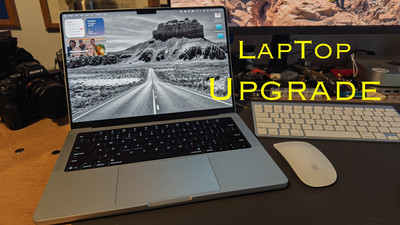
Hey Ya'll! Hope everyone is having a great week. We just got through a big snow storm (for us) in North Carolina with about 10 inches of snow and very cold weather. So I've been inside for almost a week. Just went out today. So I've been spending my time getting ready for presentations that I'm doing this year for our photography club and writing blogs. Really anything inside that I can do to keep me from going crazy. Last year I sold one of my cameras. You can check out the link here Paring Down My Cameras. Now I took the money that I made and just put into savings and vowed when I got my income tax return I would use it and the tax return to buy a new laptop. Well while being cooped up in the house I did my taxes as soon as I could and got my return very fast. So with all that said I'm buying a new Laptop ! Yay! I haven't bought a new laptop since 2017 when I purchased a Macbook Air which I used until about a year or so ago when I bought a 2018 MacBook Pro from one of my club members. It had better specs than the Air that I had. It was always meant to be a go between until I could get a new Laptop. Well that day has come.

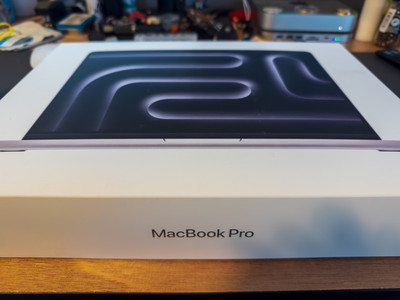
The Laptop. The laptop that I chose was the Apple MacBook Pro with the M-5 Chip. It's the 14 inch model with 32 gig of memory and a 1TB SSD hard drive. My motto has always been buy the best computer you can afford. So that's what I did. I'm a retired military and I used the Apple Military discount store which saves you 10 % off of the cost of the computer. I'm not going to quote the price but it's a lot ! But I think Mac's are worth the price because they last pretty long without having to replace. They very rarely have any software or virus problems. The only reason I'm replacing the one I have now is because it struggles with editing photo's. It also won't update to the newest Lightroom or Photoshop. But if I was using it for web surfing and writing my blogs it would still be a fine laptop to have. This new laptop should be lightning fast and be able to handle anything I throw at it.

Why I need it? I need it for mobile photography editing and backing up. I have been using a iPad pro with a M-1 chip in it and it works well but my eyes aren't as good as they used to be and I need the bigger screen. My main computing when not on the road is still my MacMini that has the M-2 chip in it and I have a 27 inch screen on it. If you've been following my blogs you know that I'm building an "Adventure Van" that I will take trips on and I need a laptop that I can depend on to edit and do research with while on the road.  This will be a perfect matchup with my Starlink mobile satellite dish. I'll be able to watch movies , do research on trips and edit and backup files while on the road. It has a battery life of up to 24 hours according to the Apple site. At any rate it will last a long time without charging and power management is important when traveling on the road. 

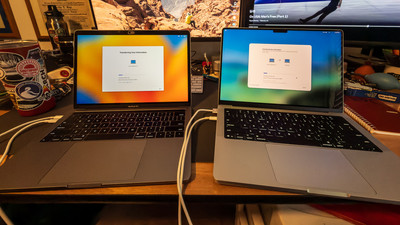
Well I'm writing this section about a week after the last paragraph and my computer has come in. Yay! I have migrated all of my stuff off of my old MacBook Pro and it went without any problems. I have wiped clean the older laptop and am donating it to a family member. My new laptop is set up and I'm using it right now to finish this blog. I've got most of it set up that I can and it's working great! Nice and fast and responsive like I expect it to do. I did get a Silver one although I loved the grey one that my older MacBook was but that color wasn't offered only black and silver and I didn't want a black one it reminded me of a work computer and I don't work anymore. The new computer does lots of neat stuff that I haven't even figured out yet but I will let you know how it works out. Well that's enough for this week. Until next week, Get out and Shoot!

Hey if you want to check out my photography go to my instagram account Max Stansell Photography there are over 2000 posts there. Here is the link

 Max Stansell Photography Instagram Link


Cabin Fever? #396

February 13, 2026  •  Leave a Comment

Hey y'all! Hope you're having a great week! Me? Okay all things considered . It's been unseasonably cold here in the south this year. We've had an Ice Storm and a pretty good Snow Storm along with frigid temps. This current weather pattern has lasted over a month keeping most folks trapped inside. Photography outside has been limited because of the weather. Well at least for me it has. So I've been stuck inside trying to stay warm and listening to my heating system run non stop for over a month trying to keep up. My camera club "GAPC" (Goldsboro Area Photography Club) had to reschedule a meeting due to weather and then the date that we had rescheduled to had bad weather also so we had to have our meeting via Zoom. That kind of sucked because I was giving a presentation and I would much rather do that in person than over the internet. We had a workshop planned that we also had to reschedule and then on the reschedule date the roads on the wildlife preserve we were going to were closed due to bad weather. I was recently talking to one of our members and he was telling me about his "cabin fever" and really I thought it was just me but it wasn't it was him too and he had talked to another member with the same conclusion all this bad cold grey weather has gotten to us. So what can we do? Well there are some indoor photography things you can do to keep you from going crazy. Here is a link to a blog I did on some stuff to do also that you can check out Photography when you can't get out

Indoor Photography: Doing indoor "Table Top" photography is where I really started my digital IMG_1118IMG_1118 photography journey. Finding stuff to shoot in your house can be very fun and interesting. Learning to use lights on smaller subjects will help you in lighting people for portraits. Which you can also do indoors. What about food photography. When it's cold nothing better than a nice bowl of chili. You could photograph that or whatever you're cooking to keep you nice and warm. What about digitizing all of those old photo's that you have stored in shoe boxes? That is a great project also to do. 

Education: Learning more about your camera. Dive into the menus and learn how to operate your camera will help you when you can get out and shoot. You won't have to fumble around looking for the setting to use. You can do it while you're on the couch watching TV with the camera in your hand going through settings and menus. There are all kinds of online education from Free on YouTube to paid services like Kelby One. Educating yourself will not only make good use of your time but will also make you a better photographer.

Plan for the upcoming year: Planning photography outings and trips are a great way to use the time you have in the house. Where do you want to go what do you want to see. How will I get there. Using the internet is a great thing to help research future trips. I've just started using a AI "Chat GPT" to help with itineraries and where to stay. And I must say it works out great. I plan on some trips this year with "MAV" (Max's Adventure Van) this year and already have a couple of trips planned. But first I have to finish converting it from a  cargo van to a Camper Van. Stupid weather is holding me back on this front.  But every day I get some good weather I work on it.

So as you can see there are lots of photography related stuff you can do while you are cooped up because of bad weather. Don't let the cabin fever get you down use the down time as an opportunity to get some stuff done. Well that's it for this week. If you can, Get out and Shoot! And have a great week.

Hey if you want to check out my photography go to my instagram account Max Stansell Photography there are over 2000 posts there. Here is the link

 Max Stansell Photography Instagram Link


Photography Apps I use on phone and iPad #394

February 06, 2026  •  Leave a Comment

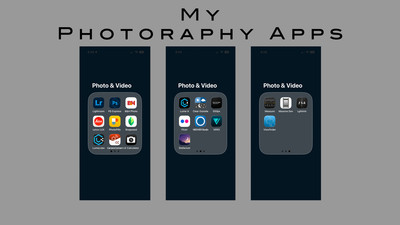
Hey Everyone! Hope Ya'll are having a great week. This week I wanted to explain what Apps I have on my phone and iPad that I use for photography. As you know the phone is a great tool for lots of stuff. Photography is at the top of the list for me. I hardly ever get phone calls and not many text but I use the phone for some type of photography almost every day. Along with my point and shoot camera it is with me everywhere I go. I use it to post to instagram, I use it for facebook and I edit on it when I'm out and about and I want to get something out quick. Some people are really good with their phones I'm okay but there is a lady in my photography club that is fantastic with hers not only for photo's but video and reels that she makes it seems like every day.  The phone has become a very important part of our lives. So I thought I would go over the apps on my phone that I use which will be different than the ones you use. Please feel free to share the ones you use and the ones you like the best. My apps fall into categories . Capture, Research, Editing, Camera Control and for me Film. 

Capture: Of course the most used app on my phone is the "Camera App" that came with my phone. It works very well in Video and photography and the interface is pretty good and you can manipulate the photographs with different adjustments like you would your camera. Other capture app I have on my phone is "Leica Lux" . It's a camera app that is suppose to mimic the look of Leica Cameras. Give them the Leica look. I've used it a few times and the look is good but I seem to use the Apple "Camera App" the most.

flickrflickr Research: I have a few of these but the biggest Elephant in the room is "Photo Pills" It is the Photoshop of researching stuff for photography. Like photoshop it is a little complicated to use. But it can tell you when the Sun or moon will rise when blue hour is the direction of the sunrise or sunset what point on the map that would be good to photograph said sunrise or sunset. It can tell you where the milky way is going to be and using AI it can give you a AI generated milky way in daylight so you can compose your shot before the sun goes down. It has a built in long exposure calculator and it can do lots of stuff. So for anything related to photographing the sky I use this app. Another good night sky app is "Stellarium" you can point your phone to the sky at night and it will tell you the name of the stars and constellations. I use it to find true north with Polaris for long exposures to give me that cool circular star trails. I also have a "Long Exposure Calculator" that I use. For me it's easier than the photo pills one. It can help me calculate long exposure time when using Neutral Density filters. I also use "Flickr"and "500px" to research photos taken at wherever I'm traveling to. This is a great way to figure out what kind of photo you can get at a unfamiliar location.

Editing: The first editing app is the "Photo's App" that comes with the phone. You can do simple editing and is getting better all of the time with AI inhansements that have been added to it recently. I also have "Snap Seed" that can be used for simple edits. My most used is the "Lightroom App" which I use to do edits and exporting of photo's. I also have this synced with my Lightroom Classic at home so I can share photos across all of my devices. I also use "Photo Shop Express" to do things like add text to photos.

Camera Control: I use Sony's "Imaging Edge" to control my camera remotely. Mainly I use it to sync my GPS coordinates with my camera so it puts them in the meta data of the photograph. I can also transfer photo's from my camera to my phone for quick editing for post to Instagram or Facebook. I have Canons "Camera Connect" so I can transfer photos from my Canon point and shoot to my phone. I have a "Lumecube" app that can control a lume cube that I have via Bluetooth. I can increase the intensity of the little light remotely. I also have a "Newer Studio" App that will do the same with some LED Pannels that I have.

Film: Shooting film has a unique set of challenges and I have a few apps to help with shooting. My first one is "Lghtmtr" which is a light meter that uses the phone's light meter to help get the proper exposure. This is just a backup for when my main meter malfunctions. I have an app called "Viewfinder" That helps me frame my shot . Especially when using different lenses. It automatically gets the perfect size so you can use it to find out what you want to shoot then you bring out your camera and set it up without luging around a big camera trying to figure out the shot. The last one is called "Massive Dev" which has all of the film developers , times, temperatures for all of the different developers and films which I use when developing my film.

There are many, many phone and tablet photography apps and I haven't even scratched the surface. Most of the apps above were free except for the "Lightroom" which came with my Lightroom subscription, and "Photo Pills" which has a one time purchase. Please share which ones that you use. So until Next week Get out and shoot! 

Hey if you want to check out my photography go to my instagram account Max Stansell Photography there are over 2000 posts there. Here is the link

 Max Stansell Photography Instagram Link


Subscribe
RSS
Archive
January February March April May June July August (4) September (4) October (5) November (4) December (3)
January (5) February (4) March April (2) May (1) June July August September October November (3) December (2)
January February March April May June July August (1) September (1) October (1) November (1) December (1)
January (1) February March April May June July August September October (3) November (2) December