How to backup while traveling. #366

July 04, 2025  •  Leave a Comment

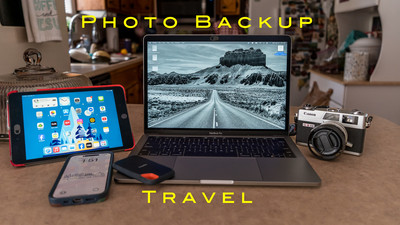
Hey Ya'll! Hope you're having a great week! Me? Not too bad thanks for asking. This week I'm getting ready for a week long trip and of course I want to back up my photo's when away. So this blog is going to be about backing up while traveling. When traveling you want to be as lightweight as you can. Not lugging around heavy camera equipment or heavy computer. Lots of people use their Laptop as their main computer not only for editing photo's but for everyday stuff paying bills, banking and all of their stuff on the same laptop that they edit on. Wouldn't that be terrible to break or to have stolen with all of that info and photo's on it? It would be a disaster and ruin your trip. Most of my editing are on a mac mini desktop computer but when I go mobile I don't bring that setup. Here I will go over different ways to back up your photo's when out on a trip that you do photography on or even a vacation that you take your camera with you and you want to save the memories from the trip. I like to have at two copies of my images when traveling and keeping them in different bags incase one gets stolen or lost that way I don't loose my images. 

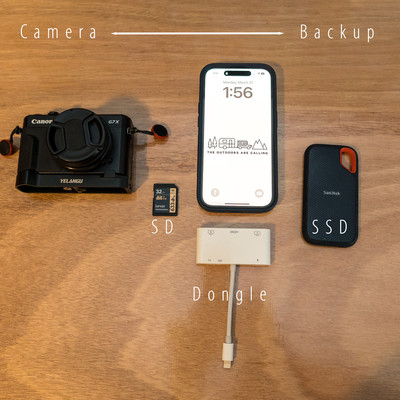
SD Card: The first line of defense is my SD card. I have a new SD card every day and the info on the older card is saved as one copy. So if I'm going on a 7 day trip I'll have 7 Cards. I know that sounds like a lot but I'm still using older cameras where the SD cards don't cost much and I buy a few every time they go on sale. I know the newer high capacity newer cards cost a lot more money and may not be feasible to do but that's what I do every day new card.

SSD External Disc-The next thing you will need is an external disc drive. Small disc drives are easy to cary and can hold lots of photo's and video. I would recommend a Solid State Drive (SSD) A SSD drive is better than the older disc drives because there is no moving parts that could fail like in the older drives. This is the drive that you would copy all of your photo's from each day.  I have a 1TB drive but you can get them in any size. The larger your file size or your sensor the larger the drive because the file size of the larger megapixel cameras take up more space.

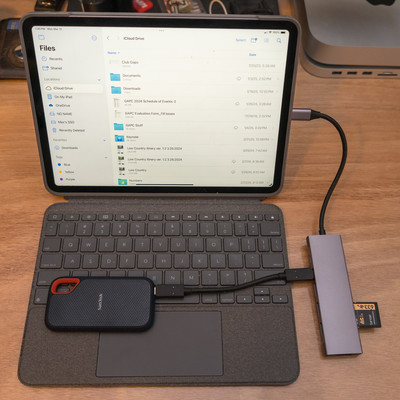
Laptop: Now you could use a laptop but I wouldn't recommend if it is your main computer. I am really not a laptop guy but I bought a used laptop from a friend that upgraded to a newer model and I got it fairly cheap. It's a 13 inch laptop lightweight and I got it just so I'd have something to use when I have to run a Camera Club meeting. My old laptop was too weak to do this. I will be taking this on my next trip but just because I don't have much money into it and wouldn't be crushed if something happened to it what I would recommend is the next two options.

Dongle: A dongle is something that sticks into your laptop, Tablet or phone. It's used to transfer files , upload or just give you a connection to hook another device to your laptop, Tablet or phone. It will have different ports on it from USB-C, USB-A, HDMI, SD card, so whatever you have will plug into and connect to your device. They are inexpensive and really come in handy.

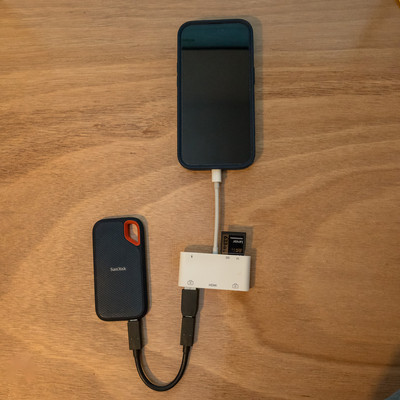
Smart Tablet: I have used a smart tablet to do a lot of trips to edit and to backup my photo's. The way it works is you hook a dongle to the tablet (must have the correct port for your device) Once it's hooked up you attach your SSD drive to dongle and SD card to Dongle . Then you can use the "file App" on your iPhone (Android has the same thing) and you can copy files off of your SD card and put them on a file on Your SSD Drive. I usually have a file named Day 1, Day 2, etc... It usually takes just a couple of min. and you will have backed up your SD Card onto the SSD Drive. Once it's there you can view the files on your SSD drive and pick the one you want to edit and download to your tablet and edit. I wouldn't recommend downloading to the tablet itself filling up your memory . Then you can easily post to social media from your device.

Phone: Using your phone is probably the most convenient way to do it. Just like the Smart tablet you just use your phone instead of the tablet with the dongle and everything else is the same. The great part about this way is the only thing that you've added to your travel gear is the SSD drive and a Dongle that will fit your phone. Easy Peasy!  No extra equipment or stuff to lug around an airport. Many photographers use this method when they travel. The only drawback is the size of the screen when you edit. But you could totally used to backup your images.

I have taken small trips where the phone was the only device I took with me but usually it's a tablet that I would take because I like the bigger screen but the process is the same.  Easy ways to backup your photo's when traveling so until next week Get out and Shoot!


Hey if you want to check out my photography go to my instagram account Max Stansell Photography there are over 2000 posts there. Here is the link

 Max Stansell Photography Instagram Link


Using your phone as a gap lens! #368

June 27, 2025  •  Leave a Comment

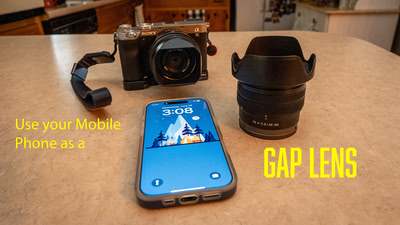
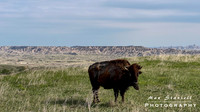
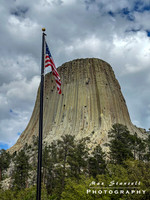
Hey Everyone! I hope everyone is doing well. Me ? I'm great I just got back from a big (for me) Photography trip to South Dakota. This week I want to talk about using your phone as a gap lens. Todays smart phones have great camera's in them and to use them as gap or extra lenses in your kit can be very convenient . When you take a trip the last thing you want to do is carry everything you own. Being lightweight and nimble is a great advantage when on a trip. On this last trip to South Dakota I really only brought 2 lenses for most of my photography. A 20-70mm and a 100-400mm monster. I did not bring a wide angle lens or a macro lens and am glad I din't. My bag with the 100-400 was heavy enough I'm glad that I didn't bring any more lenses. Lugging a super heavy bag through airports is really a pain not to mention going through security.

A smart phone (I'm using an iPhone) is a great addition to your camera kit. For one thing it uses computational photography to capture the photo's that you take. Every time you take a shot your camera takes about 15 and blends them together with some magic sauce and produces really great photo's. They are great for really hard lighting situations because of this.  They are also great for panoramas stitching in all of the photo's in camera. Most new cameras will shoot in raw also so editing in post is a breeze. So what does my phone take the pace of when I travel?

Macro lens. I don't carry a macro lens anymore because my iPhone does it well enough for me when I'm on the go. The extra weight of a 105 f/2.8  macro lens is not missed when traveling through airports or just lugging around on my back with my other lenses. You always have your phone in your pocket and they just work.

Wide angle lens. I don't tend to carry anything wider than a 20mm lens anymore. Although 20 is pretty wide sometimes that 16mm or even wider works great to be able to get stuff into your frame. Being able to whip out my phone and go super wide is a great advantage over lugging another lens around. And the photo's come out great!

Another way I use my smart phone is to try to take a photo with it every location that I go . It's super easy to edit on the phone I can send the photo to Lightroom or to some other editing software that I have on my phone and can easily export to social media either facebook or to instagram. The quality of the photo's for social media is super and the shots really look good on these platforms.

Being able to use my phone in conjunction with my camera kit creates a lethal combo where I can get the shot that I want without carrying around a big kit. I often use when I'm doing Landscape or street/travel photography also. And not to mention the selfie! Getting shots of yourself in different locations is fun and sharing with family and friends they can tell a story in themselves.  Until Next week use your phone and Get out and Shoot!  


Hey if you want to check out my photography go to my instagram account Max Stansell Photography there are over 2000 posts there. Here is the link

 Max Stansell Photography Instagram Link


My Favorite Camera #361

June 20, 2025  •  Leave a Comment

Hey Ya'll, How's your week going? Me? Pretty good. Today I want to talk about what my favorite camera is to shoot with. Now I am very lucky I have many cameras accumulated during my years of photography from film to digital and out of all of the camera's I have I have a couple that I would call my favorite. They are not necessarily my best camera's or my newest. They are not even the ones that I would take on a big trip. But they are fun to shoot. And that's the most important thing I think is that they are fun to shoot. That's why we do photography because it's fun and a great way to experience life. First we'll talk about film camera's because film and digital are different animals.

Film Camera's. I have been shooting my own film camera's from the mid 1970's and have had and accumulated quite a few camera's. My first camera in film was the Pentax K1000. This is the camera that I learned basic photography on. Nice and simple the only thing that wasn't mechanical was the meter in it that was powered by batteries. I have shot 110 camera's for family stuff but to tell you the truth the ones I used were like toys and didn't take very good photo's. 35mm has been my standard for years and I have just got into 120 medium format film. My favorite film camera is a 35mm and cost me just 120 dollars. It's the Canon Canonet QL17 GIII. It came out in the 1972 and is a range finder camera. It is known as the poor man's Leica.  It focus is quick and precise. The QL in the name stands for quick loading which it is and easy to load. It can shoot in Shutter priority and will not shoot if you are way out of whack with your settings. It will shoot in manual. And it is a very handsome camera. I have got nothing but great photo's out of it. It has a 40mm fixed lens with a maximum aperture of f1/1.7. My runner up is a Canon Demi EE17 which is a 1966 camera that shoots half frame 35mm. It is a sexy camera and the only thing that kept it my top spot is that it uses zone focusing so sometimes you get out of focus shots. If it had the same focusing as the Canonet it would be #1. But the Canonet Ql17 GIII is my favorite film camera to shoot.

Digital Camera's. From my first digital camera a Kodak point and shoot I have gone through many camera's. From High end professional models to consumer camera's. Some were more fun to shoot than others. I have shot Simi professional with high end cameras and as an amateur like I am now with consumer and of course I use my phone like everyone else. Let me start out by saying that my phone isn't my favorite digital camera although it does get great photo's when needed. I have shot all different sensor sizes and have enjoyed all of them. Most of my photo's in my website are shot in crop sensor (APSC) sized. I am shooting full frame sensor Sony's now as my main camera's and love the results I get from them and they go with me when I travel for photography trips. With all of the lenses that come with them. My favorite camera to shoot and the one that I use the most isn't a full frame or a crop sensor camera. Its smaller. Now I have camera that will shoot under water and if you count GoPros ones that will clip onto things for unique shots and even shoot video's. But it's not those camera's also. The thing that makes it the most favorite for meIs the mobility of this little camera. It can fit in my pocket or around my neck and hardly is noticed. I purchased this little camera to go to Washington DC with my wife. I wanted a camera that I wouldn't be consumed by while with her. So she wouldn't have to wait on me fumbling with lenses or settings. It's a perfect travel companion and goes with me on almost every trip. It's so versatile that I use it as a backup to my bigger Sony's when I travel. It's the Canon Powershot G7XII which came out in 2016. It has a 24-100mm full frame equivalent lens at f1.8-2.8. It has a 1" sensor at 20megapixels. Its articulating screen is also a touch screen and can easily move focus with a touch of the finger. I have it set up so it will accept 52mm filters like a polarizer and ND filter. It also has an electronic ND filter that you can use. It shoots in Manual and all of the other modes that my larger cameras do. Is it perfect? No but it is my favorite. It goes with me almost anywhere for the just in case photo's. Are other camera's better ? You bet but this one is fun. When I take my big trips this year it will be right beside me. When I went to South Dakota it was there for shots in the car and in towns. I didn't carry my big camera for town walks just this little point and shoot.

How funny is it that even though I am a devoted Sony shooter my favorite camera's to shoot are both Canon. Digital and Film. LOL Both of these cameras are point and shoot camera's and I don't have to mess with bringing extra lenses and gear when I'm out and about with these cameras. What are your favorite camera's to shoot? Camera's are very personal things and I suspect there will be all sorts of answers to that question. Well that's it for me this week until next, Get out and Shoot. With your favorite.

Hey if you want to check out my photography go to my instagram account Max Stansell Photography there are over 2000 posts there. Here is the link

 Max Stansell Photography Instagram Link


The Mechanics of OFF Camera Flash #360

June 13, 2025  •  1 Comment

Hey Everyone! Hope you've had a super week! This week I want to talk about something I don't think I've talked about much. Off camera flash and the mechanics on how to hook up your camera to shoot off camera. I was recently on a workshop that my club had on Portrait Photography and using off camera strobes. You may not know but I used to do a lot of portrait work and shot weddings and the such. But as I've got older I haven't done as much. You can use off camera flash to do all sorts of photography from table top , macro, real-estate and yes portraits. Attending this workshop got me thinking about the past and the tools and the mechanics on how to set up off
camera flash even if you shoot film instead of digital. Honestly I haven't shot much off camera flash with film but have recently and it works pretty well you just have to figure out how to get the flash to sync with your camera when you push the shutter button. Now most camera's have a hot shoe on top of your camera that you can put a flash and through the connection when you push the shutter your flash goes off. This is a very flat and not flattering light and to improve it you must get the flash off of the camera and to the side somehow. Thats what this blog is about the mechanics of OFF Camera Flash. 

Sync Cord: The easiest way is with a sync cord. This cord goes from a port on your camera (usually covered by a little plastic cover) to a port on the flash or strobes that you have. This is how it was done in the old days and cords and cables were strewn all over the place. This is a cheap way to do it and it works. The drawback is the cord you can only go as far away from your flash with the length of your cord.


Infra Red triggers: Infra Red triggers are built into some camera's. They allow you to trigger the flash through an infra red signal that comes from your camera to the flash. The trick is that it is proprietary. You must use your camera's brands flash. With Nikon you must use Nikon flash , Canon you must use Cannon flash. Which makes this a very expensive endeavor as brand name flashes are very expensive. Also you must have line of site with these triggers . Much like the remote control of your TV you can't have anything get in-between the camera and flash or it doesn't work.


Radio Triggers: These triggers use radio waves to transmit a signal from your camera to the flash or strobe. You hook a transmitter to your camera's hot shoe and receiver to your flash or strobe light. Then through radio waves you can trigger the flash to fire when you press the shutter button. These are very popular and come in many price ranges from 40 dollars to hundreds of dollars. Pocket wizards were the industry standard many years ago but you can have all sorts that work great. The biggest thing with these is to make sure that you are not on the same frequency as another nearby photographer or your flashes will work off of his press of the shutter too. These triggers do not need line of site and can be placed almost anywhere and the radio waves will reach them witch is great for back lighting where the light is placed behind the subject. These types of triggers only trigger the flash they do not work with TTL of your camera they are used on manual flashes and strobes.

TTL Radio Trigger/Controllers: Then there is the Controller trigger. It takes all the info from your camera and transfers it to the strobe and makes the proper power flash off of these calculations. It can shoot TTL and High Speed Sync. It can control from your camera many flashes at one time and have them flash at different powers to each flash. These triggers are proprietary to the brand of camera you have. So if you have a Nikon you have to get a controller that fits a Nikon. The controller mounts to the hot shoe and you can dial in what you want and what channel each flash is on. You can have external receivers or they are built into the flashes themselves. The flashes/strobes have to be compatible with the controller used. Godox brand is the most popular but there are others also. The controllers cost about 70 bucks but you must also purchase the flashes and or strobes .

Slaves for Multiple flashes: If you have more than one flash that you want to trigger but only have one trigger and one receiver or only have a sync cord going to one flash you can use optical flash slaves that hook to the second flash or strobe. When it sees a flash from the first flash that is synced it goes off instantaneously . You must manually adjust these flashes but the system works well and I used it for years before I got newer trigers for my flashes. 

Being able to control the light really makes you a great photographer and shooting off camera flash and strobes is the first step in really being able to CONTROL the light. Not just react to it. Hope this was helpful until next week Get out and Shoot!


Hey if you want to check out my photography go to my instagram account Max Stansell Photography there are over 2000 posts there. Here is the link

 Max Stansell Photography Instagram Link


Packing for a Street Photography Trip #359

June 06, 2025  •  2 Comments

Hello Everyone! Hope you're having a great week. Me? Pretty well. Hey I was thinking about what I would take on a Street photography trip let's say to New Your City. The Big Apple! I have never been but am looking to go soon so what would I take on let's say a long extended weekend trip. What camera gear or my computing needs for that matter. I know I want to be quick and nimble while in route so just a carry on bag if flying or taking the train. So I would want all of my gear and clothing to fit in the carry on which would be some sort of backpack. Light on gear and clothes. So let's get started with the easy stuff clothes.

If I was going on a 4 day trip to include travel days on each end. I would probably take two pairs of pants the ones I was wearing and one other. And a couple of shirts. These clothes would have to be very packable not jeans or clothes like that. I like to travel with convertible pants that can become shorts at a moments notice and shirts that are super light weight. Just to make things easier well say that this trip is in the spring so cool in the mornings and warm during the day. So I would want some sort of jacket that would compact down to a small size when it warmed up. Just a few personal toiletries to get by with. A comfortable pair of shoes because I'll be doing some walking. I would put all of this in some sort of packing cube that would fit in my backpack.

Now let's talk about camera gear and computing. I'll start with computing because I would keep it simple some sort of iPad maybe my iPad mini. It's small and compact and I'll be able to back up my photo's from each day and even edit some if I need to. Now to camera gear. I have lots of good choices to choose from. If I wanted to keep it super small I could use my point and shoot Canon G7XII . Its small compact, 20mp type 1 sensor and has a 24-100 equivalent lens with maximum aperture of f/1.8-2.8. It's very discrete and small and would go almost unnoticed . But never have been to New York before I would want something a little more punch. I would probably bring my A7C with a 50mm and a 16-35mm lens. Both are small-ish but would definitely be noticed more than the point and shoot. And of course I would have to carry some sort of bag to hold the extra lens and batteries. Or I could carry a 20-70 f4 lens I have and the Sony and just do one lens. It would be a bigger set up but it would have a better camera set up with just one lens. Now if I was really brave I could go with a film camera and shoot film the whole time there. If I were I would bring my Canon Cannonet GIII QL17. This is known as the poor mans Leica with a 40mm f/1.7 lens. It would definitely tic all of the boxes but then its film and won't be as flexible as digital. So what to do? On a special trip like this I could go without a camera and plan a trip to B&H Photo Video and buy a camera for street there. It would almost be worth it maybe something like a Fuji X100 a built to be a street camera. There are so many ways to go. What would you do?

Well since this is all hypothetical I would probably go to B&H and buy a new camera just to say that I had done it. But in reality it would probably be the Sony A7C although I think the smart choice would be the Point and shoot.  Well that's just me dreaming. What would you do? Let me know. Until next week Get out and Shoot!

Hey if you want to check out my photography go to my instagram account Max Stansell Photography there are over 2000 posts there. Here is the link

 Max Stansell Photography Instagram Link


Subscribe
RSS
Archive
January February March April May June July August (4) September (4) October (5) November (4) December (3)
January (5) February (4) March April (2) May (1) June July August September October November (3) December (2)
January February March April May June July August (1) September (1) October (1) November (1) December (1)
January (1) February March April May June July August September October (3) November (2) December